How To Get Phone Icon Back On Iphone

Your iPhone’s Phone icon has vanished. Not “hiding behind a folder” vanished. Full-on magician’s rabbit disappeared. Before you dial 911 on a friend’s Android, take a breath....

Your iPhone’s Phone icon has vanished. Not “hiding behind a folder” vanished. Full-on magician’s rabbit disappeared.
Before you dial 911 on a friend’s Android, take a breath. Your phone app is almost certainly still there, just sulking in a digital corner.
Here’s the weird part: the Phone app is basically indestructible. You can’t delete it like a random game you downloaded at 2 a.m. But you can remove it from your Home Screen, which makes it look deleted.
Must Read
Rude, but reversible. Let’s get that green handset back where it belongs.
First, Check the App Library
Swipe left past your last Home Screen page until you hit the App Library. That’s the organized junk drawer Apple built so we could stop pretending we’d ever sort 147 apps manually. Search for “Phone” at the top.
Once you see the Phone icon, long-press it. Tap Add to Home Screen. Boom: the green handset returns like a sitcom character who was never really gone.
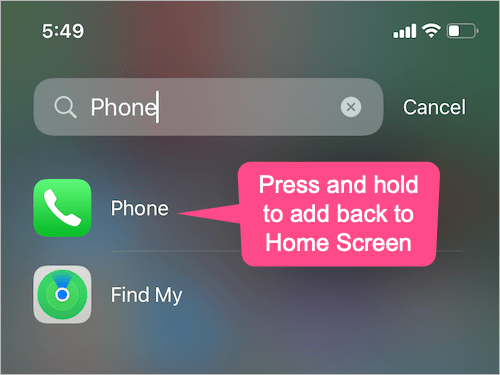
If it’s not in the App Library, swipe down from the middle of the Home Screen. This opens Spotlight search. Type “Phone.”
If the app shows up, tap it. Then go back to the App Library, long-press Phone, and choose Add to Home Screen. Sometimes the app just needs a formal invitation.
Did You Hide a Whole Home Screen Page?
iOS lets you hide entire Home Screen pages. It’s great for hiding your 14 folders of “someday” apps. It’s less great when your Phone icon lives on page four and page four is now in witness protection.
Long-press an empty spot on the Home Screen until the icons wiggle. Tap the row of dots near the bottom. You’ll see checkmarks for each page.
 Iphone 5 Phone Icon
Make sure the page where Phone normally lives is checked. Tap Done. If that doesn’t work, check inside folders, especially that one called “Utilities” or “Stuff I Never Open.”
Screen Time Might Be Grounding Your Phone App
Yes, your iPhone can hide the Phone app through Screen Time restrictions. It’s like your device grounding itself. Go to Settings > Screen Time > Content & Privacy Restrictions.
Tap Allowed Apps. Make sure Phone is toggled on. If it’s off, the icon can vanish and calls may act weird.
Flip it on, and the icon should reappear. While you’re there, check if other restrictions are set to “Don’t Allow.” Usually not the culprit, but Screen Time loves chaos.
Check for a Restriction Profile
If your iPhone is managed by a school or workplace, a configuration profile can hide apps. Go to Settings > General > VPN & Device Management. If you see a profile you don’t recognize, ask your admin before deleting it.
On personal phones, this is rare. But it’s worth a peek if every other fix failed. A hidden Phone icon can be a policy thing, not a ghost.
Restart, Reset, and Other Classic Panic Moves
Sometimes iOS just glitches. A simple restart is the digital equivalent of turning it off and on again. Hold the side button and a volume button, slide to power off, wait, then turn it back on.
If that fails, try a force restart. Press volume up, then volume down, then hold the side button until the Apple logo appears. No data lost, just a tiny reboot drama.
 Phone Icon Missing On Iphone
Still missing? Go to Settings > General > Transfer or Reset iPhone > Reset > Reset Home Screen Layout. This puts built-in apps back in their default spots and removes folders.
It won’t delete your data, but your Home Screen will look like it just moved into a new apartment. You may need to rearrange a few things afterward. Small price for getting Phone back.
The Nuclear Option That’s Not Really Nuclear
Update iOS. Go to Settings > General > Software Update. Apple occasionally squashes bugs that make icons play hide-and-seek.
A fresh update can bring Phone back without you sacrificing a chicken or your passcode. If you’re already up to date, restart once more for good measure.
If none of this works, back up your iPhone and contact Apple Support. But honestly, most missing Phone icons are in the App Library, a hidden page, a folder, or Screen Time jail.
Fun fact: the Phone app has been on iPhone since the very first model in 2007. It’s older than the App Store, which arrived in 2008.
So if it’s missing, it’s not because it got evicted. It’s just being dramatic. Swipe left, search “Phone,” check restrictions, and reset the layout if needed.
Your green handset will be back before you can say “Can you hear me now?” Probably.
